
Once you’ve created your swimbooker account (or if you already have one), logging in is a breeze! You can access your account through our website or mobile app. We highly recommend downloading the swimbooker app from the Apple App Store or Google Play Store so you stay logged in and get the best experience! ✅
🖥️ Logging in on the Web
-
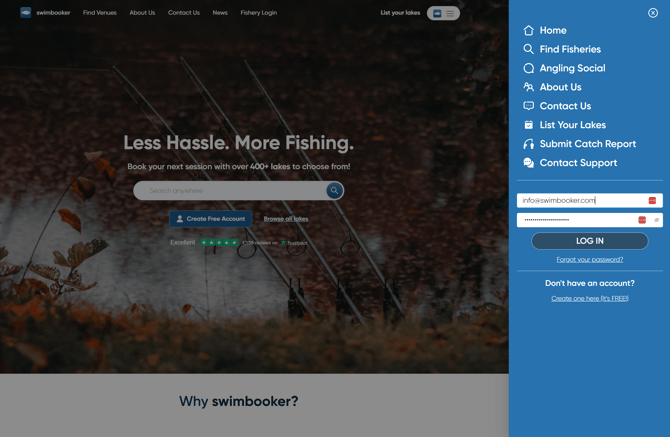
Go to the swimbooker homepage.
-
Click on the hamburger menu icon (three horizontal lines) in the top corner.
-
A side menu will appear with navigation options and the login form.
-
Enter your email and password into the form.
-
Click the Log In button.
-
That’s it — you're in! 🎉
📱 Logging in on the Mobile App
-
Open the swimbooker app.
-
You can either:
-
Tap the top right menu icon to bring up the login form directly, or
-
Tap MySB from the navigation bar at the bottom.
-
-
If you tapped the menu icon, enter your login details and press LOGIN.
-
If you tapped MySB, you’ll see a big blue button that says Sign In — tap that.
-
Enter your account email and password in the form.
-
Tap Sign In and you’re ready to go! 🎣
.jpeg?width=277&height=600&name=download%20(1).jpeg)
🔐 Forgot Your Password?
No stress! If you’ve forgotten your password, just click here to reset it. You’ll receive a reset link by email — follow the steps to set a new password and get back in.
Need more help? You can always reach out to support and we’ll get you sorted in no time 😊