
If you received an email with an exclusive 25% off offer, here's how to redeem it in just a few steps.
Step 1 — Go to the swimbooker+ PRO sign-up page
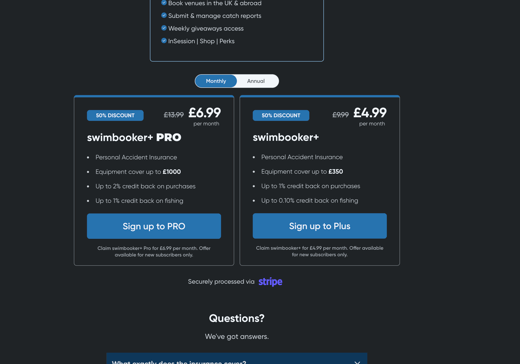
Click the link or button in your email. This will take you directly to the checkout page for swimbooker+ PRO.
Step 2 — Select your plan
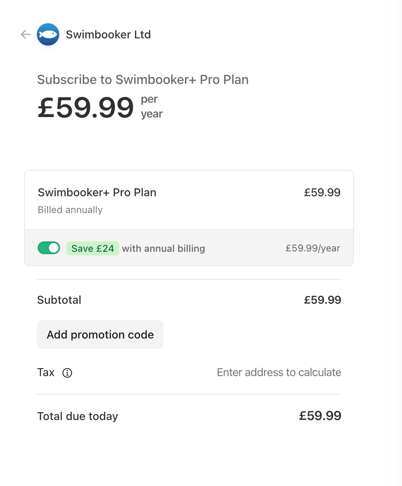
You'll see the PRO plan on the checkout page. If you want annual billing, toggle the "Save £24 with annual billing" option to switch to the annual plan (£59.99/year before discount).
Step 3 — Add your discount code
- On desktop, you'll see an "Add promotion code" field in the order summary. Click it, type your promotion code, and press apply.
- On mobile, tap "Add code" near the top of the page, enter your promo code, and confirm.
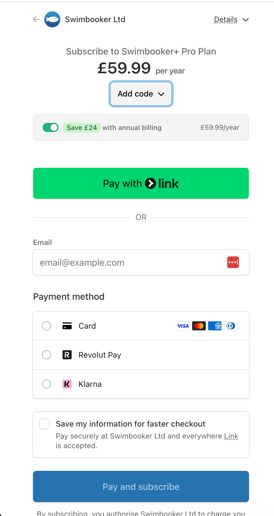
Your 25% discount will be applied automatically — you should see -£15.00 come off the subtotal, bringing the annual plan to £44.99.
You are able to use this code for the monthly plans but we recommend the annual plan to achieve the best value offer.
Step 4 — Complete your payment
Enter your payment details and hit Pay and subscribe. You'll have instant access to swimbooker+ PRO as soon as your payment is confirmed.
IMPORTANT: For smooth access, please enter the same email address you have logged for your swimbooker account.
If you have any trouble applying the code, contact us at support@swimbooker.com and we'll get it sorted.