
swimbooker gives venues the tools to manage their memberships and season tickets with ease — and we’ve made the process simple and seamless for anglers too. From applying to renewing, everything is handled directly through the platform.
🪪 Applying for a Membership or Season Ticket
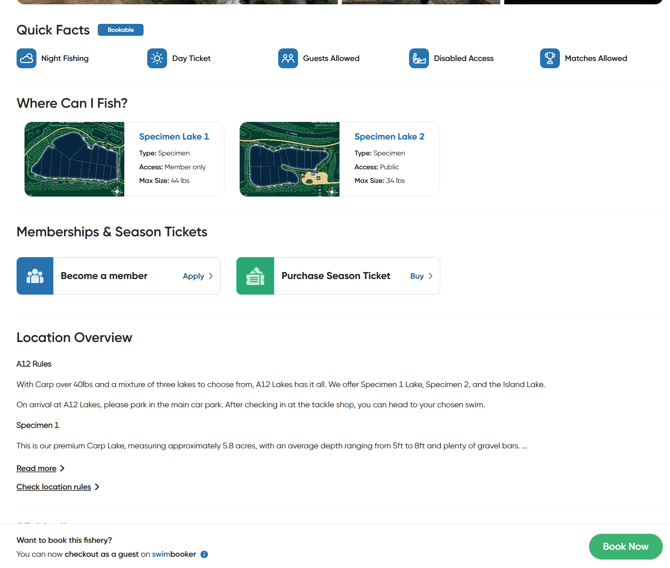
Step-by-Step:
-
Go to the venue profile on swimbooker for the fishery you wish to join.
-
Scroll to the section labelled Memberships & Season Tickets.
-
If the venue doesn’t offer these options, the section won’t appear.
-
-
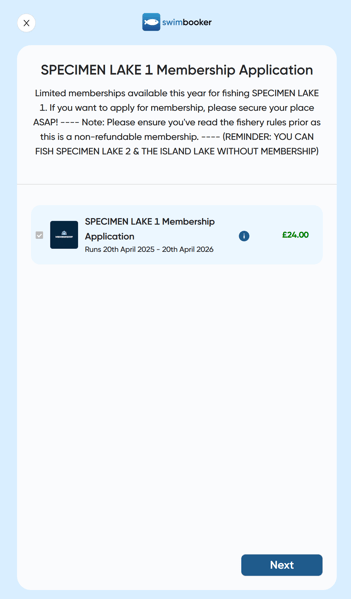
Click on the membership or ticket type that applies to you.
-
Read the title and introduction carefully — any venue-specific rules or requirements will appear here as well ⚠️
-
Tick the box next to the plan you wish to apply for. If you want more info, click the information icon.
-
You’ll see the plan duration (e.g. 12 months, fixed date)
-
The price is shown on the right-hand side 💷
-
-
Click Next and follow the venue’s instructions. Each venue may request different information (e.g. full address, experience level, proof of ID).
-
When you’re finished, hit Submit. Depending on how the venue set up their plan, one of the following will happen:
-
✅ Instant Access (Free Plan) – You’ll get membership access right away.
-
💳 Payment Required – You’ll be taken to a summary screen to pay. If the screen closes early, don’t worry — we’ll email you a link to complete payment.
-
⏳ Approval Needed – The venue will review your application before approval. You’ll receive an email when they’ve responded.
-
🔁 Membership Renewal Process
If a venue offers renewals, swimbooker will send up to 3 reminder emails when your membership is close to expiring. These emails contain a direct link to renew your plan.
⚠️ If you don’t renew in time (based on the venue’s settings), you may be removed automatically. You’ll receive an email if this happens, and you’ll need to reapply from scratch.
👀 Where to View Your Active Memberships
To check your memberships or season tickets:
-
Log into your swimbooker profile on the app or website
-
Go to your Angler Profile
-
Scroll to the section titled My Memberships
Any active memberships or season tickets will be listed here. Please note:
📌 This section does not include your swimbooker+ or swimbooker+ PRO subscription details — those are shown under the 'My Details' section in MySB+.
Need help with a membership application or renewal? Just send us a message and we’ll be happy to guide you through it! 😊